Tutorial: Create a Course AI Tutor with the Anthropic API
In this tutorial, you’ll learn how to build a Retrieval-Augmented Generation (RAG) chatbot that can answer questions about your course materials using:
LangChain for document processing
ChromaDB for vector storage and semantic search
Anthropic API (Claude) for intelligent responses
Gradio for the chat interface
What you’ll build: A Data 88E course tutor that answers questions using only official course materials, never gives away homework answers, and uses Claude via the Anthropic API.
Time to complete: 15-20 minutes (no large model download required)
Prerequisites & Setup
What each package does:
gradio: Creates the chat interfacelangchain: Handles document loading and text processingchromadb: Vector database for semantic searchanthropic: Anthropic API client for Claude responsessentence-transformers: Creates embeddings for semantic search
Requirements:
An Anthropic API key stored in
../shared/.envasANTHROPIC_API_KEYInternet connection (API calls go to Anthropic’s servers)
API Key Setup
To keep credentials secure, the API key is not stored directly in this notebook.
Instead, it is stored in a .env file inside a shared directory (../shared/.env) with a line like:
Prerequisites & Setup
Install all required packages. If you are running this for the first time, this may take a minute or two.
What each package does:
gradio: Creates the chat interfacelangchain: Handles document loading and text processinglangchain-huggingface/langchain-chroma: Updated integrations replacing deprecated LangChain built-inschromadb: Vector database for semantic searchanthropic: Anthropic API client for Claude responsessentence-transformers: Creates embeddings for semantic searchpython-dotenv: Loads the API key from a.envfile
#pip install gradio langchain langchain-huggingface langchain-chroma chromadb anthropic sentence-transformers python-dotenv
#!pip install langchain-text-splitters langchain-huggingface langchain-chroma
#!pip install langchain-community
Imports and Configuration
Import all libraries and set the paths for your documents and vector database.
Important: Change DOCUMENTS_PATH to point to the folder containing your course markdown files.
import gradio as gr
from langchain_text_splitters import RecursiveCharacterTextSplitter
from langchain_huggingface import HuggingFaceEmbeddings
from langchain_chroma import Chroma

from langchain_community.document_loaders import DirectoryLoader, TextLoader

import anthropic
import os
from dotenv import load_dotenv
VECTOR_DB_PATH = "./chroma_db"API Key Setup
The API key is loaded from a shared .env file so it is never hardcoded in the notebook. The .env file should contain a line like:
ANTHROPIC_API_KEY="sk-ant-..."Students should never print the API key or share the .env file contents publicly. The key can be rotated by updating the shared .env file; all dependent notebooks will continue to function.
load_dotenv('/home/jovyan/shared/.env')

anthropic_api_key = os.getenv('ANTHROPIC_API_KEY')

print("API Key loaded:", "✅ Ready" if anthropic_api_key else "❌ Not found — check your .env file")
If the key was not found, you can paste it directly here instead (never commit this line to GitHub):
# Uncomment the next line and paste your key if load_dotenv did not find it
# anthropic_api_key = "sk-ant-XXXXXXXXXXXXXXXXXXXXXXXX"
Data 88E Training Materials
Data 88E (Economics and Data Science) being mostly in the public licensed repos, offers an opportunity for training data for a fine-tuned LLM tutor. The course is designed to teach students how to apply data science tools to economic questions, using Python and real-world datasets. The course is built around as set of github repositories that contain all the materials, including:
Textbook: The main course content is in the form of a Jupyter Book
88e-textbookLecture Notebooks: Each lecture has a corresponding Jupyter notebook with code examples and exercises ( e.g. LectureNBs)
Slides: Lecture slides are also available in Google Drive and converted to markdown in the training materials (google drive)
Course Calendar: The schedule and topics covered each week are documented in calendar from the course website, also converted to markdown for trainint Fall 2025 Calendar
Training Data Preparation
The Making_training_material repo contains the source files and scripts used to convert raw course content into clean markdown, pulling from the textbook, lecture notebooks, slides, and course calendar.
The parsed output lives in 88e_training_material — a self-contained, subject-specific corpus built entirely from the course’s own open-source materials, used to fine-tune the model into a grounded tutor for the course.
Download the materials Skip this cell if you have already downloaded the materials.
repo = "https://github.com/data-88e/88e_training_material"

url = f"{repo}/archive/refs/heads/main.zip"
r = requests.get(url)
z = zipfile.ZipFile(io.BytesIO(r.content))
z.extractall("./")
!ls -l 88e_training_material-main/
Step 1: Load Course Documents
This step loads all markdown (.md) files from your course materials folder.
What’s happening:
DirectoryLoaderscans the folder recursivelyglob="**/*.md"finds all markdown files in all subfoldersTextLoaderreads each file as plain textDocuments are stored with metadata (filename, path) for source citations later
Expected: You should see “Loaded X markdown files” where X is the number of .md files in your folder.
Textbook for now let’s just load the textbook files to keep it simple, but you can load all materials by changing the path and glob pattern.
DOCUMENTS_PATH = "./88e_training_material-main/F24Textbook_MD"print("Loading documents...")
loader = DirectoryLoader(
DOCUMENTS_PATH,
glob="**/*.md",
loader_cls=TextLoader,
loader_kwargs={'encoding': 'utf-8'}
)
documents = loader.load()
print(f"✓ Loaded {len(documents)} markdown files")Step 2: Create Vector Database (Embeddings)
This is the most important step for RAG. We convert each document chunk into a vector (an array of numbers) so we can search semantically — meaning questions that are similar in meaning to a passage will match it, even if the exact words differ.
How it works:
Each chunk is converted to a 384-dimensional vector using
all-MiniLM-L6-v2Vectors are stored in ChromaDB for fast similarity search
The database is saved to disk so you only need to do this once
First run: Takes 1-3 minutes to create embeddings
Subsequent runs: Loads from disk in ~5 seconds
if os.path.exists(VECTOR_DB_PATH):
    print("Loading existing vector store...")
    embeddings = HuggingFaceEmbeddings(
        model_name="sentence-transformers/all-MiniLM-L6-v2",
        model_kwargs={'device': 'cpu'}
    )
    vectorstore = Chroma(
        persist_directory=VECTOR_DB_PATH,
        embedding_function=embeddings
    )
    print("✓ Vector store loaded from disk")
else:
    print("Creating new vector store (this may take a few minutes)...")
    embeddings = HuggingFaceEmbeddings(
        model_name="sentence-transformers/all-MiniLM-L6-v2",
        model_kwargs={'device': 'cpu'}
    )
    vectorstore = Chroma.from_documents(
        documents=splits,
        embedding=embeddings,
        persist_directory=VECTOR_DB_PATH
    )
    print("✓ Vector store created and saved")
Step 3: Initialize the Anthropic Client
Instead of downloading and loading a local model file, we create a lightweight client that connects to Claude via the Anthropic API. No large downloads or special hardware required.
Model options:
| Model | Speed | Quality | Input (per 1M tokens) | Output (per 1M tokens) |
|---|---|---|---|---|
claude-haiku-4-5-20251001 | Fastest | Good | $0.80 | $4.00 |
claude-sonnet-4-6 | Fast | Better | $3.00 | $15.00 |
A typical RAG query uses roughly 600-1000 tokens total, around $0.0005 per question with Haiku. You can swap CLAUDE_MODEL at any time to upgrade response quality.
client = anthropic.Anthropic(api_key=anthropic_api_key)
CLAUDE_MODEL = "claude-haiku-4-5-20251001"

try:
    client.models.list()
    print(f"Anthropic client initialized (model: {CLAUDE_MODEL})")
except anthropic.AuthenticationError:
    print("Authentication failed — check your API key")
except Exception as e:
    print(f"Client initialization failed: {e}")
Step 4: Create the RAG Chat Function
This is where the RAG pipeline runs. Every time a student sends a message, the chat() function:
Retrieves the 2 most relevant document chunks from ChromaDB using semantic search
Builds a structured message list with up to 3 prior exchanges for conversation context
Calls
client.messages.create()with the retrieved context embedded in the user message and the tutor rules passed as thesystemparameterReturns Claude’s response with source filenames appended
The system prompt enforces Assignment-Safe Mode — Claude will never give direct answers to homework questions, only conceptual guidance and pointers to course materials.
RAG flow:
User question -> Retrieve relevant chunks -> Build messages list -> Call Anthropic API -> Return response + sourceschat_history = []
def chat(message, history):
global chat_history
# Retrieve relevant documents
docs = vectorstore.similarity_search(message, k=2)
context = "\n\n".join([doc.page_content for doc in docs])
# Build conversation history as proper message list (last 3 exchanges)
messages = []
for user_msg, bot_msg in chat_history[-3:]:
messages.append({"role": "user", "content": user_msg})
messages.append({"role": "assistant", "content": bot_msg})
# Append current message with retrieved context
messages.append({
"role": "user",
"content": f"""Use the following course materials to answer my question:
--- COURSE MATERIALS ---
{context}
--- END COURSE MATERIALS ---
My question: {message}"""
})
# System prompt
system_prompt = """You are "Data 88E Tutor", a course assistant for Foundations of Data Science and Economic Models.
**Core Mission:**
1. Answer student questions only using official FA24 course materials: Slides, Lecture Notebooks, Textbook.
2. Stay within course scope.
3. Never give away assignment answers. Help students learn how to find and verify answers themselves.
**Assignment-Safe Mode (Always On):**
Always assume a question is from homework/labs/projects unless stated otherwise.
**Hard rules:**
- Do not provide final numeric answers, exact code that works on real datasets, or correct options for multiple choice.
- Do not reveal dataset-specific statistics, parameter values, or test expectations.
**Instead, provide only:**
- High-level strategy, conceptual steps, and why they matter.
- Pseudocode or toy Python snippets on fabricated mini-datasets.
- Relevant formulas (symbols, not assignment numbers) + variable definitions + units.
- Pointers to exact Slides, Lecture Notebooks, and Textbook sections.
**Style:**
- Be concise, step-by-step, and student-friendly.
- If uncertain, say so and point to the closest reading."""
# Call Anthropic API
response_obj = client.messages.create(
model=CLAUDE_MODEL,
max_tokens=512,
temperature=0.7,
system=system_prompt,
messages=messages
)
response = response_obj.content[0].text
# Update history and append sources
chat_history.append((message, response))
sources = set([os.path.basename(doc.metadata.get('source', 'Unknown')) for doc in docs])
if sources:
response += f"\n\n📚 *Sources: {', '.join(list(sources)[:2])}*"
return responseStep 5: Launch the Chat Interface
Creates a Gradio chat interface and launches it as a local web server. Setting share=True generates a public URL valid for one week that you can share with students.
After launching:
Click the local URL (e.g.
http://127.0.0.1:8768) or the public share linkStart asking questions about course content
Try the example questions to get started
Tips:
Responses arrive in 1-3 seconds via the API
Chat history is maintained within the session
Restart the kernel to clear conversation history
print("\n" + "="*50)
print("Starting Gradio interface...")
print("="*50 + "\n")

demo = gr.ChatInterface(
    fn=chat,
    title="📚 Data 88E RAG Chatbot",
    description="Ask me anything about the course materials! Powered by Claude via the Anthropic API.",
    examples=[
        "What topics are covered in this course?",
        "Explain the Kuznets Hypothesis",
        "What is economic data science?",
        "Summarize the main concepts"
    ],
)

if __name__ == "__main__":
    demo.launch(
        share=True,
        server_name="0.0.0.0",
        server_port=8768
    )
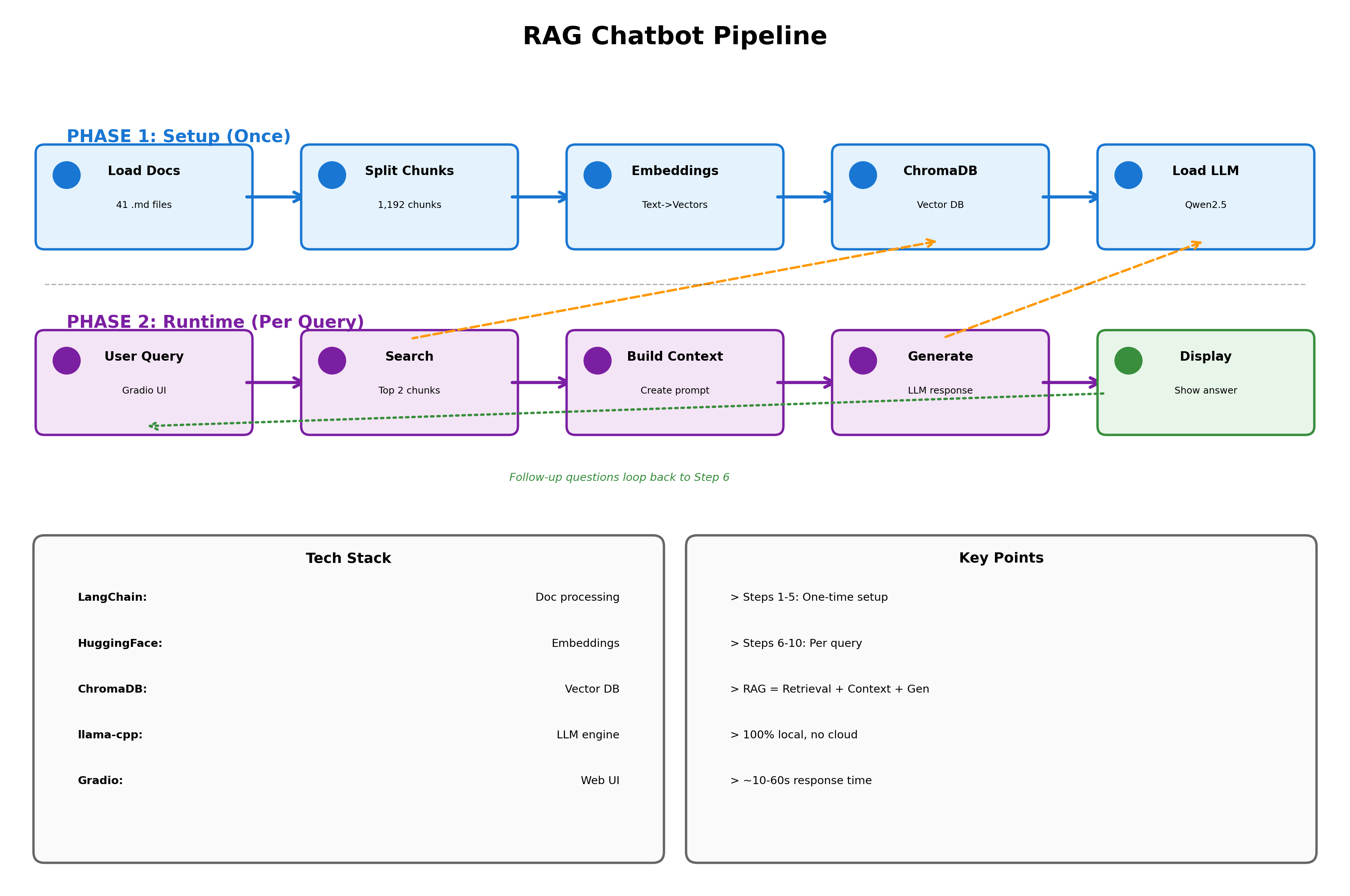
How the RAG Chatbot Works
This diagram shows the complete pipeline of our chatbot, from initial setup to generating responses.
Phase 1 (Steps 1-5) happens once when you first run the notebook. We load your course materials, split them into chunks, convert them to vectors, and store everything in a database. This takes a few minutes but only needs to run once.
Phase 2 (Steps 6-10) happens every time you ask a question. The chatbot searches for relevant chunks, builds context from your course materials, generates an answer using the local LLM, and displays it back to you. Each query takes 10-60 seconds depending on your CPU.
Usage Tips & Troubleshooting
How to Use the Chatbot
Ask questions naturally: “What is GDP?” or “Explain regression”
Reference specific topics: “Tell me about Week 5 content”
Ask for clarification: “Can you explain that in simpler terms?”
Test assignment understanding: “How would I approach calculating elasticity?” (gets conceptual guidance, not answers)
What to Expect
Good questions:
“What is the Kuznets Hypothesis?”
“How do I interpret regression coefficients?”
“What’s the difference between GDP and GNP?”
Won’t get direct answers to:
“What’s the answer to Problem 3?”
“Give me the code for Question 2”
“Which option is correct: A, B, C, or D?”
Troubleshooting
Problem: “Loaded 0 markdown files”
Check that
DOCUMENTS_PATHpoints to the correct folderVerify the folder contains
.mdfiles
Problem: “Cannot find empty port”
Change
server_port=8768to a different number (e.g., 7860, 8080)
Problem: API key not found
Ensure
../shared/.envexists and containsANTHROPIC_API_KEY=sk-ant-...Or set it manually in the optional cell below the key loading cell
Problem: Responses are empty or unhelpful
Check that documents loaded correctly in Step 1
Increase
k=2tok=3to retrieve more context chunksRestart the kernel and re-run all cells
Performance Tips
To improve quality:
Switch
CLAUDE_MODELtoclaude-sonnet-4-6for more nuanced answersIncrease
k=2tok=3for more retrieved chunksIncrease
chunk_sizeto 1000 for more context per chunk
To reduce costs:
Keep
max_tokens=512(avoid inflating unnecessarily)Stick with
claude-haiku-4-5-20251001for the cheapest capable modelReduce
k=2tok=1for retrieval